
Auclio is a no-code platform for building focused business applications without traditional software development.
It allows teams to replace spreadsheets, emails, shared documents, and manual processes with structured applications tailored to the way they work. You define what information the application holds, how it is displayed, who can see it, and how it moves through your process. Auclio builds the working application from that configuration.
What Auclio can be used for #
Auclio suits many processes. Typical applications include:
- customer and account management;
- project and task tracking;
- requests and approvals;
- incident and health and safety reporting;
- expense management;
- asset registers;
- customer and partner portals.
An application can be as small as a single page listing one dataset, or as large as a department-wide system with dozens of pages, related datasets, workflows, and permission rules.
Standalone and connected applications #
Every Auclio application stores information locally or through a connection. One application can use both at the same time.
A standalone application uses only the built-in connection that Auclio creates automatically. The objects live in Auclio, and Auclio is the only place they are managed. Nothing else needs to be installed. This is the right choice when the information does not exist anywhere else yet.
A connected application uses an additional connection. M-Files DMS is currently the only external system Auclio connects to.
An M-Files-connected application uses an additional connection to an M-Files vault. Objects, properties, files, dropdown values, and workflow states come from the vault, and the vault remains the source of that information. Auclio displays it, and writes changes back. This is the right choice when M-Files already holds the documents and metadata, and you want a simpler, task-focused interface on top of it.
See Understanding connections for detailed instructions on connection types, and Connect Auclio to M-Files for M-Files connectivity.
Who can build and manage applications #
Building an application does not require coding knowledge, but it does require the right role. Auclio distinguishes three kinds of account:
- Admin — can configure datasets, connections, workflows, and permissions. A tenant administrator can do this across the whole tenant, and is the only kind of account that can create an application.
- User — can open the applications they have been granted access to, and can view, create, and edit objects where permissions allow it.
- Readonly User — can open applications and view information, but cannot change anything and cannot edit page layouts.
If a control described in this documentation is not visible to you, your account most likely does not have permission to use it.
See Manage users and groups for detailed instructions on accounts, roles, and groups.
Key Auclio building blocks #
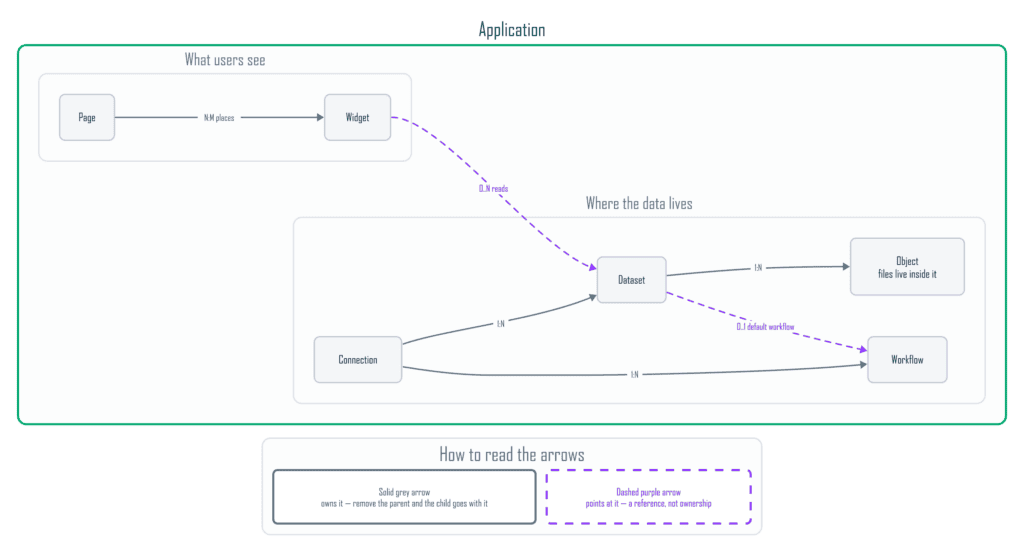
An Auclio application is built from seven core elements:
- Applications define the overall business solution.
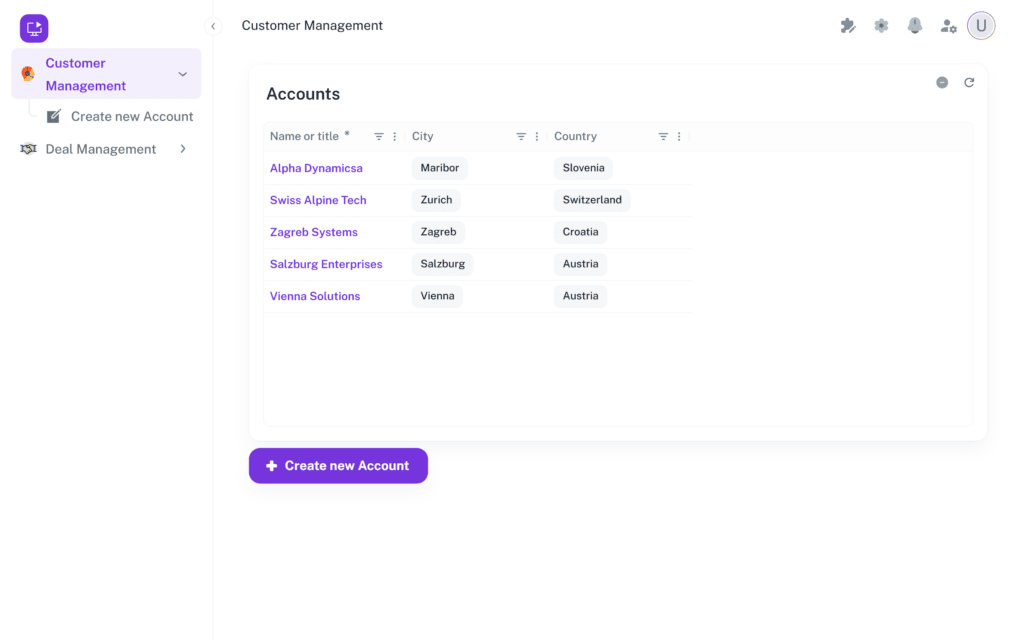
- Pages organize the application interface and determine what users navigate to.
- Widgets display data on a page and allow users to interact with it.
- Datasets define and hold the information the application works with.
- Connections determine where that information physically lives.
- Workflows move objects through the states of your process.
- Permissions control which users can see and manage each application, page, widget, dataset, and object.
These elements build on each other. A connection makes a dataset possible, a dataset gives a widget something to show, a widget needs a page to sit on, and permissions decide who sees the result.
You do not need coding knowledge to create or update an application. Users with the appropriate permissions can configure the application structure, data, interface, and access rules directly in Auclio.
See Create your first application for a walkthrough that puts all of these elements together.
