October 2026 (26.10)
Auclio 26.10 Release Notes: Single Sign-On, Org Chart Widget, Filtered Aggregations
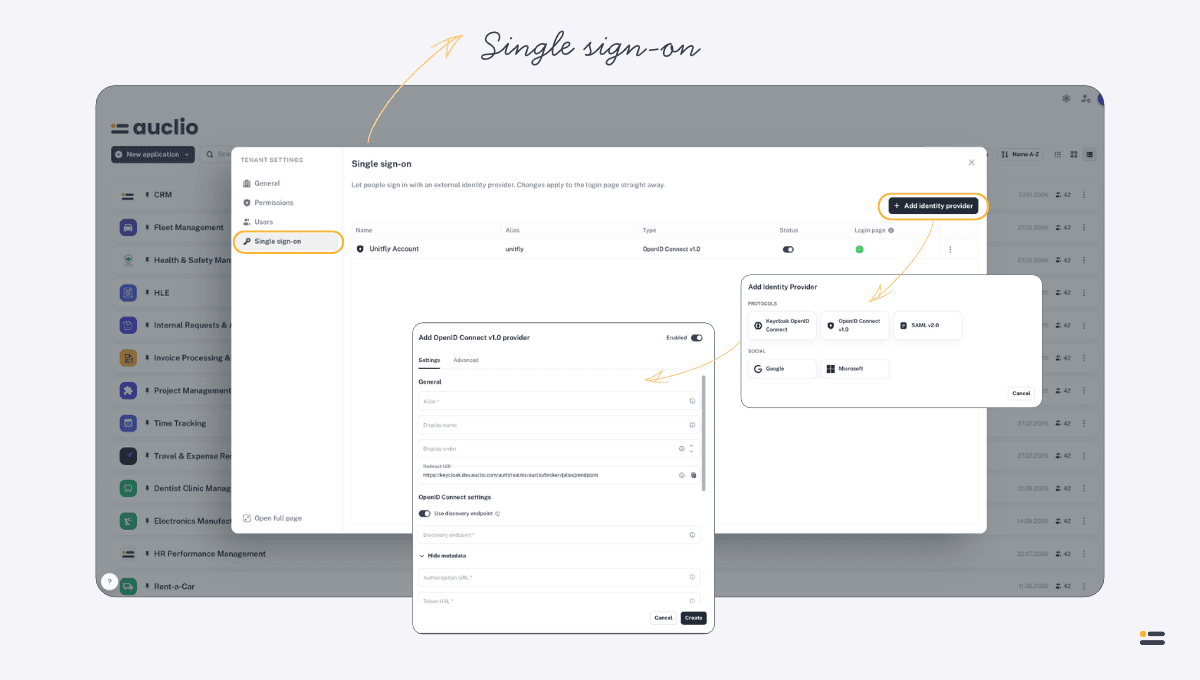
Single sign-on
Tenant administrators can now connect their own identity providers, so users sign in to Auclio with the accounts they already have.
- New “Single sign-on” tab in tenant Settings, visible to tenant administrators
- Add OpenID Connect, SAML, and social login providers — import settings from a discovery URL or metadata file, or download Auclio’s SAML service-provider metadata
- Enable, disable, edit, and delete providers, and choose which ones appear on the login page
- Map provider attributes, roles, and groups onto Auclio users
- Copy the redirect URI and a direct-login link for each provider
- Tenant Settings tabs are regrouped into General, Permissions, Users, and SSO
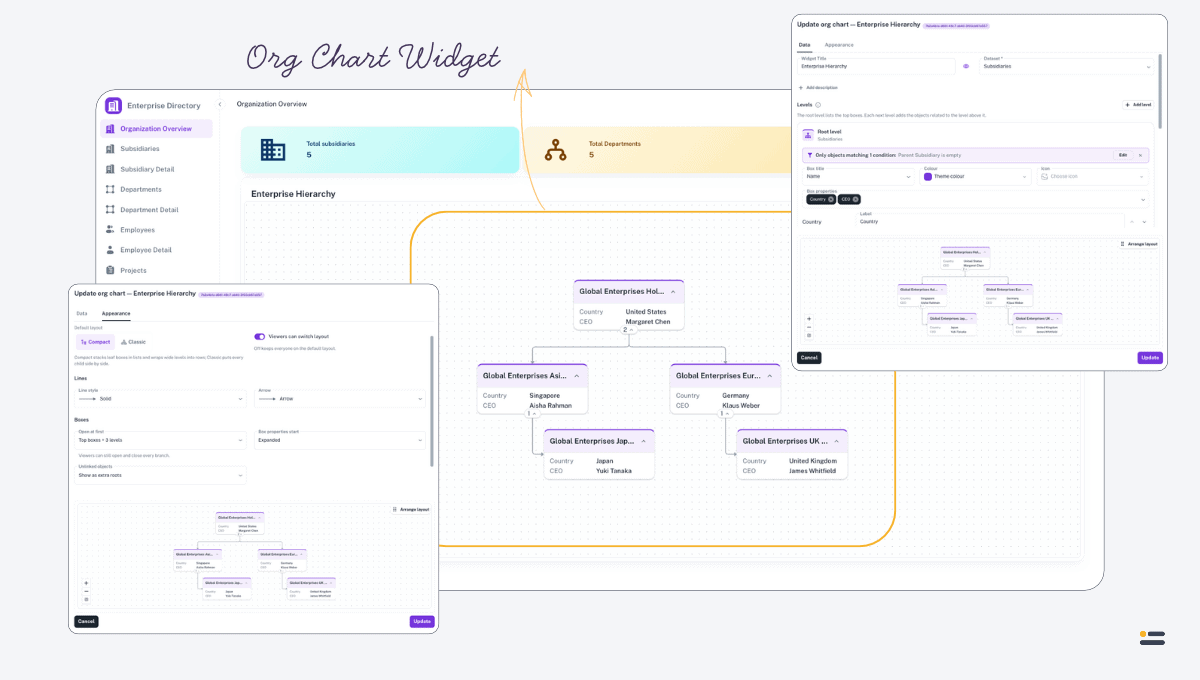
Org Chart Widget
A new widget that shows objects as an interactive hierarchy, built from the relationships already in your data.
- Build a chart level by level from dropdown relationships, with separate filters for each level
- Zoom, pan, fit to screen, full screen, and collapse branches or box details
- Switch between Compact and Classic layouts
- Choose what clicking a box does: open read-only details, open a linked page, or expand/collapse its branch
- Administrators can drag boxes into a saved layout (with undo), set line and arrow styles, icons, and how many levels start expanded
- Export the chart to PNG or PDF
- The AI Assistant can propose Org Chart widgets
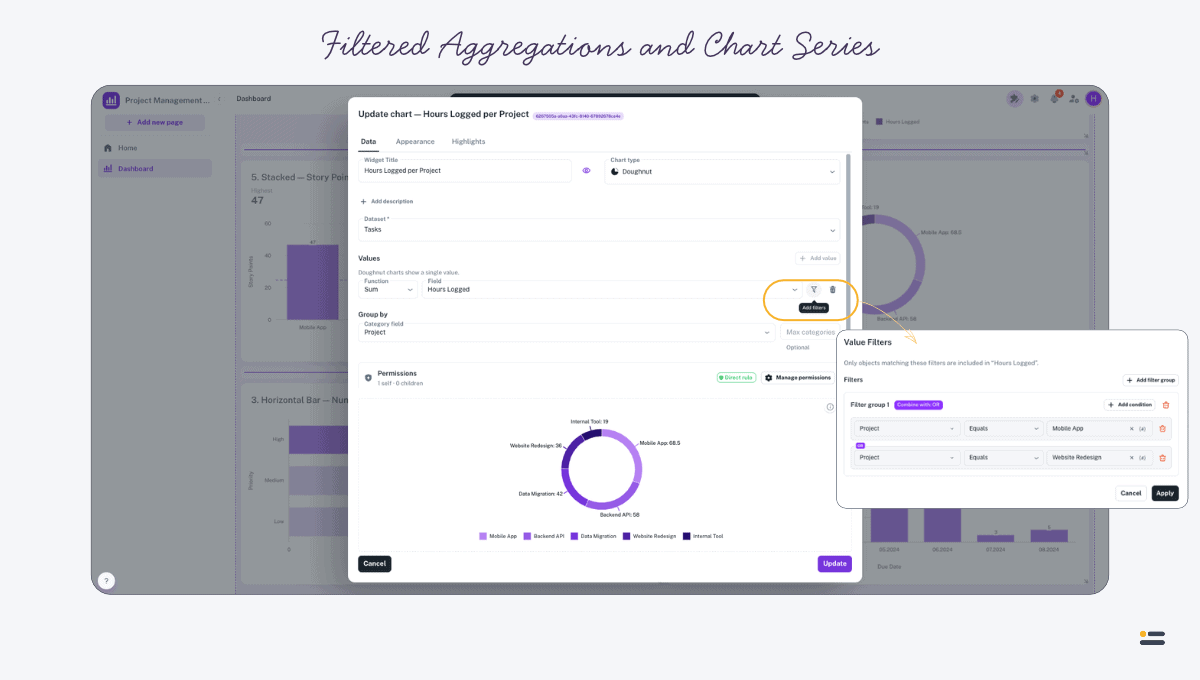
Filtered Aggregations and Chart Series
Cards, buttons, text, and charts can now count or sum just the objects that matter.
- Add filter conditions to an aggregation — for example “Count of Orders where Status = Open”, or “Sum of Amount where Order = $(OrderId)” on a detail page
- Filter each chart series independently; a badge shows how many filters are applied
- Filter on dataset properties, system fields, workflow states, and properties of linked objects
- Values can use page parameters and special values, and filters always respect read permissions
- Parameter and text fields use a new token editor with drag-and-drop tokens
- The AI Assistant can propose filtered aggregations
Workflows
- Workflow states can now set property values automatically when an object is created in that state or moves into it — fixed values or expressions (Auclio workflows only, not M-Files workflows)
Applications
- New blank applications get a Home page automatically
- The application title is shown in the sidebar on desktop and mobile, and links to the application’s Home page
- Creating an application is faster
Live Permission Updates
- When a user’s access changes, their open pages and widgets refresh automatically — no reload needed to see the new permissions take effect
AI Assistant
- When the AI provider is temporarily busy, the assistant now waits and retries automatically instead of stopping with an error
Datasets and Tables
- Read-only lock: properties used in a dataset’s query conditions can no longer be made editable by mistake
- Tables now show a notice when datasets are joined on a multi-select dropdown
- Dependent (parent-filtered) dropdowns now work when adding or editing rows directly in a table
Security
- Users with read-only access are now consistently prevented from making changes everywhere, including adding, editing, and deleting table rows, bulk edits, and Text Grid submissions
- Importing an application can no longer affect datasets that belong to a different application
- Widgets and connections can no longer be moved, linked, or copied across applications
- Sign-in tokens are now checked even more strictly
Performance
- Faster page and table loading, bulk deletes, and permission checks
Bug Fixes
- “Contains”, “Does not contain”, “Like”, “Starts with”, and “Ends with” filters now work with page parameters that point to multi-select dropdowns, matching any selected value, ignoring case
- Filtering a grouped, joined table no longer shows empty groups
- M-Files datasets whose conditions span several classes now pick up their objects correctly
- Pulling a single property value from M-Files no longer clears the object’s workflow, which caused the next workflow transition to fail
- Making a property unique when duplicate values already exist now shows a clear error message
- Large whole numbers are no longer corrupted when saved
- Text Grid submissions now update the object they are showing instead of creating a new one
- File uploads no longer get stuck as “pending”, and file rules are checked again when the upload is saved
- Changes to an object’s workflow now appear in its history
- Deleting a linked child object no longer leaves orphaned objects behind
- Dataset refreshes now report completion accurately, instead of finishing before every change was applied
- Many errors now show a clear message instead of a generic server error
- Canceling a request (for example, by navigating away) no longer shows an error message
- New users appear in the Users tab immediately