Version 26.2 of Auclio delivers major improvements in M-Files synchronization, new widget customization options, and enhanced mobile user experience. This release focuses on reliability, better visibility into sync status, and more flexible UI building for complex business applications.
Here’s what’s new in Version 26.2
M-Files Sync Improvements
M-Files adapter now uses background job architecture with task-based processing that ensures graceful handling of network failures and minimal impact on M-Files users. Adapter dashboard has been improved for better operations visibility, health reporting, and tracing.
In Auclio portal, we introduced clear, inline sync-state feedback for files and properties so users can immediately see whether changes are synchronized with M-Files, are being synced, or have failed and require attention.
Sync status is now shown directly in relevant UI contexts (table and text grid cells, and file cards), instead of being hidden in backend processes.
On sync failure, users can open detailed error context and trigger Retry sync directly from the interface.
For property-level issues, users can Pull value from M-Files to resolve mismatches from the source system.
Visit the Auclio and M-Files integration page for more general information.
New Options in Text & Card Widgets
Markdown support and text alignment controls (horizontal and vertical) have been added to Text widget. Users can now create, edit, and manage text widgets with richer formatting control.
In Card widget, font size can now be changed both for primary and secondary text.
New options in Table & Text Grid Widgets
Data-heavy widgets like Table and Text Grid now provide better defaults, clearer values, and fewer edge-case issues.
In Table widget, users can now configure default grouping, default sorting, and column auto-size mode.
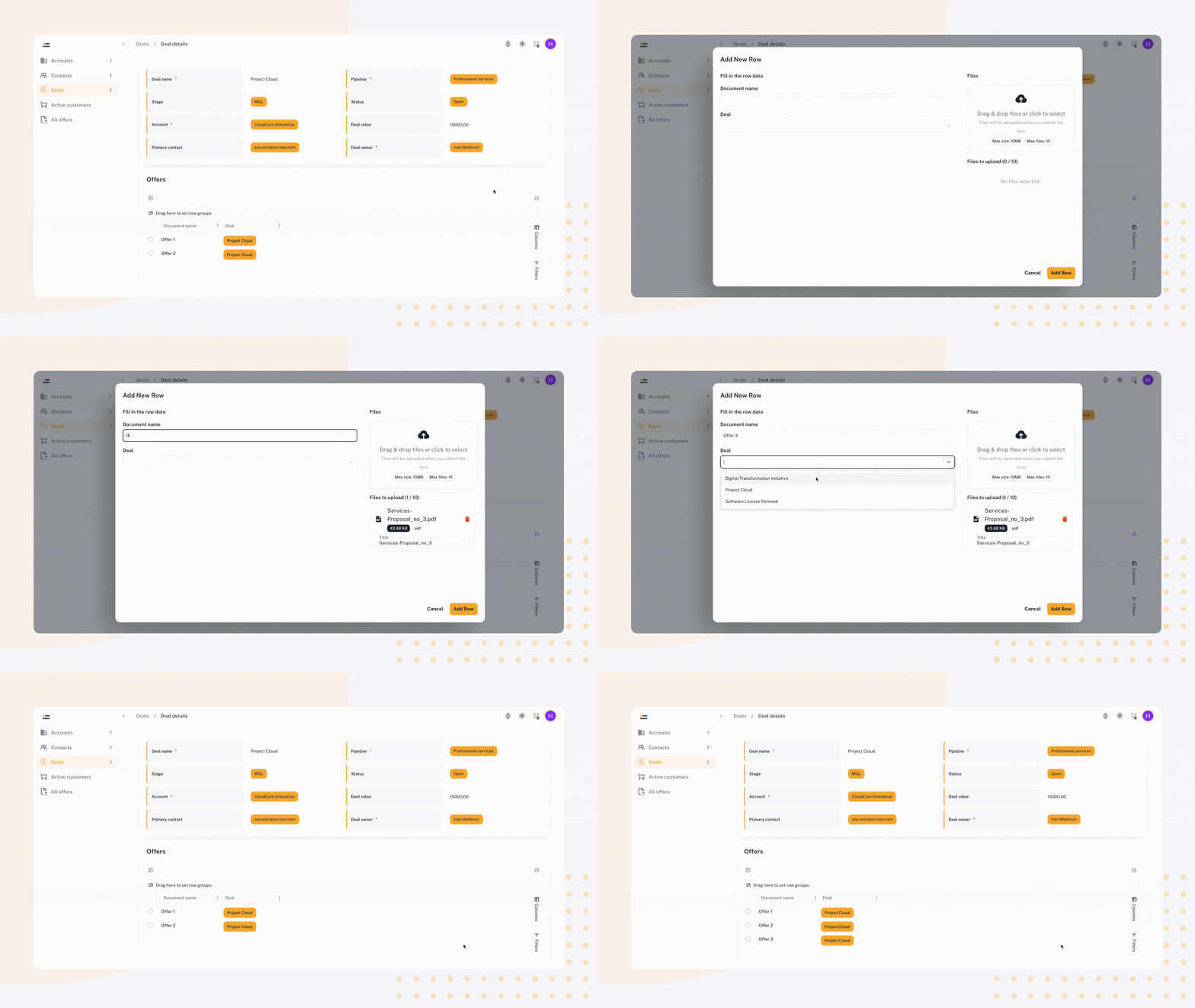
Also, it is now possible to add new row and at the same time upload files to table using a modal window.
Page Building & Navigation Improvements
Page structure and navigation behavior were expanded to support more complex app layouts.
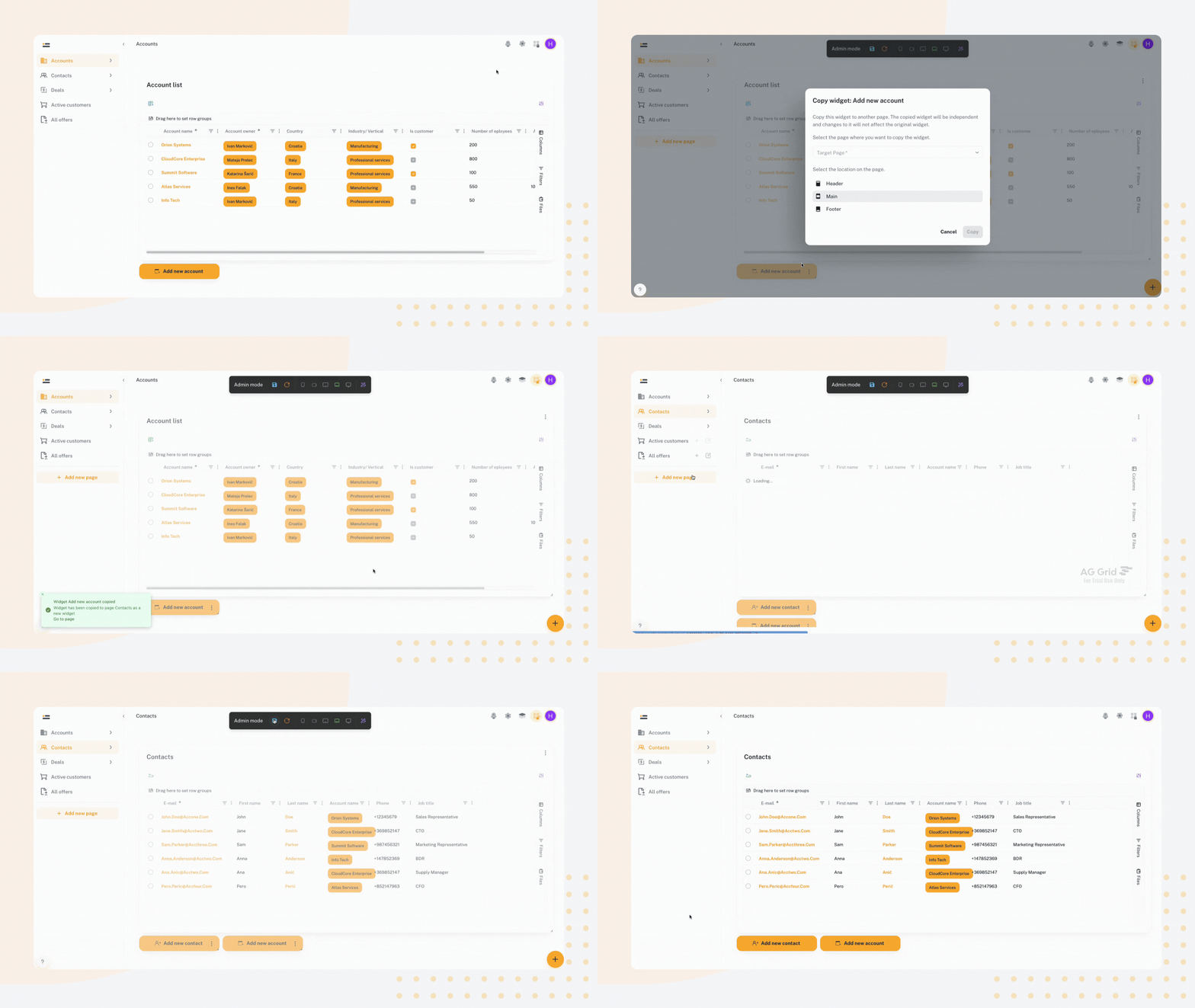
Users can now add simple widgets to sticky page headers and footers.
New widget cloning, removal, and copy actions improve page editing speed.
File Upload Protection
File interactions are now safer and more predictable during navigation. Users receive warnings before leaving pages during active file uploads. This navigation interception helps prevent accidental upload interruption.
Mobile & Compact-Screen UX Improvements
Multiple UI refinements were delivered for smaller screens.
Side panel positioning and height calculation were fixed for compact displays.
Small-screen layout and spacing adjustments were applied across key screens.
Platform & Integration Enhancements
Core platform updates were introduced that improve reliability, compatibility, and visual consistency.
AG Grid was upgraded to v35 with dark mode style fixes.
RabbitMQ resilience was improved with blocked connection handling and additional logging.
App branding was extended to the browser tab icon (favicon), so users see the app’s logo consistently in both the UI and the tab.
Looking for previous releases?
Here you can browse our full Release Notes archive.